Guide
How to score a round, every setting, how handicap strokes and each game are worked out, the course code, and what the research behind GOLF HUD found.
Scoring a hole
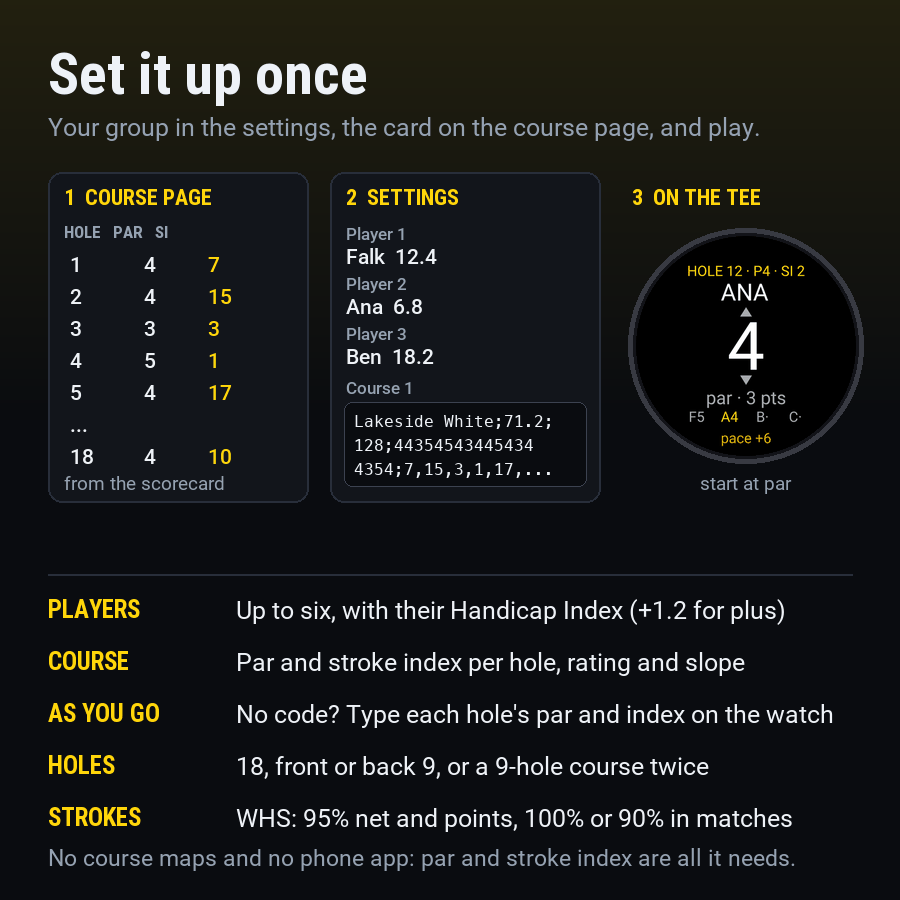
- Each player’s number starts at par. UP and DOWN (or swipe, or tap above and below the number) change it; SELECT (or tapping the number) keeps it and moves to the next player. Below 1 is X, a picked-up ball.
- Dots beside a name are the strokes that player gets on the hole: in the match, skins and wolf when one is on, otherwise for net and points. A bar means a plus handicap gives one back.
- BACK goes to the previous player; on the first player it leaves the app, with everything saved.
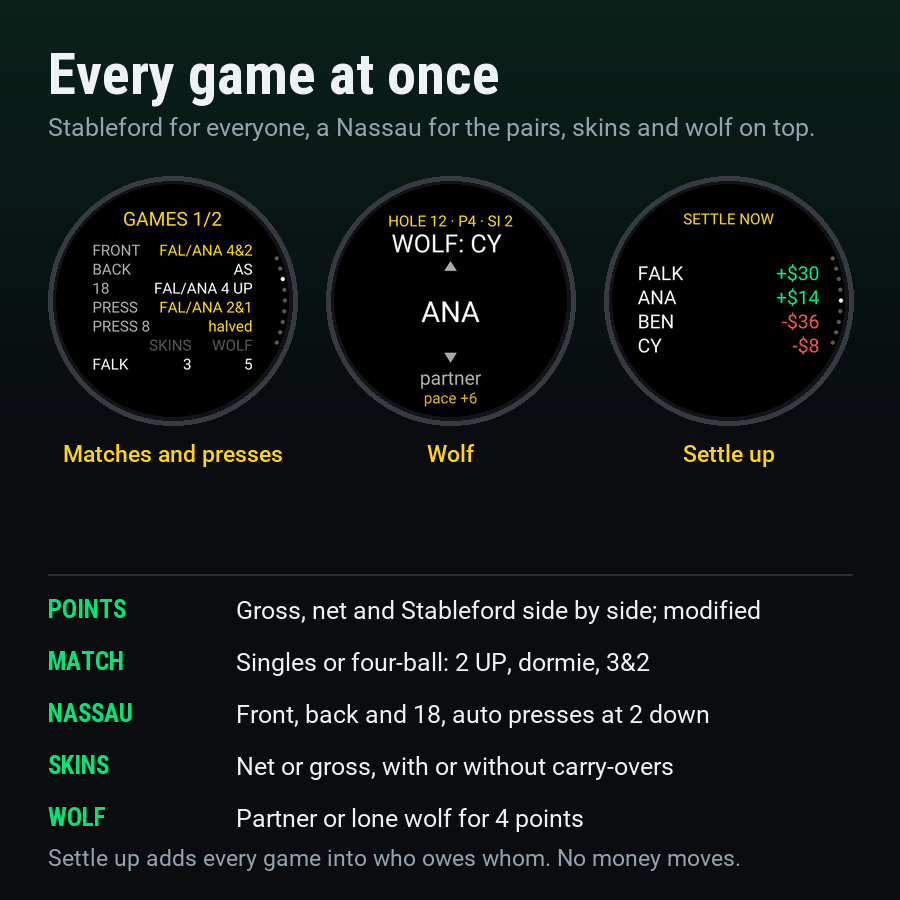
- With wolf on, the wolf’s choice comes first: a partner, or LONE.
- Playing “As you go”, the first visit to a hole asks for its par and stroke index; the course is kept when you end the round.
- Tap the header, hold the screen, or press MENU for the round menu: continue, leaderboard, games, scorecard, edit a hole, start the pace clock, end the round.
Settings in the Connect IQ app
| Setting | Default | What it does |
|---|---|---|
| Player 1 to 6: name | Player 1 “Me” | Up to 10 letters; the watch shows the first five. Player 1 is you: putts, if you track them, are yours. |
| Player 1 to 6: Handicap Index | 18.0 for player 1 | Your WHS Handicap Index, 12.4; a plus handicap is +1.2. You can change it on the watch before a round. |
| Course 1 to 6 | Empty | A course code from the course page. Courses you type in on the watch are kept there as well. |
| Match and Nassau: units per bet | 1 | What each match, nine, 18 and press is worth in Settle up. |
| Skins: units per skin | 1 | Each other player pays the winner this much per skin. |
| Wolf: units per point | 1 | Settled on the difference in points between players. |
| Unit | Empty | Shown with amounts, e.g. $ or €; empty shows plain numbers. |
| Pace | 15 minutes a par 4 | Par 3s get 2 minutes less, par 5s 2 more, and a four-ball one more per hole. 0 turns the pace clock off. |
| Ask for your putts | Off | After your score, a putts step (default 2). Totals on the leaderboard. |
On the watch, before a round
| Setting | Default | What it does |
|---|---|---|
| Course | Your first course | A course from the settings, one you typed in before, or “As you go”. |
| Holes | 18 | Front 9 or back 9 of an 18-hole course; a 9-hole course once or twice round (18). |
| Players | You | Up to four, from your players and three guests (P2, P3, P4). |
| Handicap Index | From the settings | Change anyone’s Index for today: the whole number, then the tenth. |
| Teams | 1 and 2 v 3 and 4 | For four-ball matches and the Nassau: cycle through the three pairings. |
| Match | Off | Match play (two players) or four-ball (four), a Nassau, or a Nassau with automatic presses. |
| Skins | Off | Net or gross, with or without carry-overs. |
| Wolf | Off | Four players. |
| Points | Stableford | Or modified Stableford. |
| Allowance | WHS | WHS allowances, full handicaps, or gross only (no strokes). |
| Recording | Off | Off: GOLF HUD records nothing and plays beside Garmin’s round. On: it records a golf activity, one lap per hole. |
Handicap strokes
| Course Handicap | Handicap Index × Slope ÷ 113 + (Course Rating − par), rounded; .5 rounds up. Over 9 holes, half the Index and the 9-hole rating (half the 18-hole one). |
| Net and Stableford | 95% of Course Handicap (individual stroke play). |
| Match play, two players | 100%; the lower handicap plays off scratch and the other gets the difference. |
| Four-ball, skins, wolf | 90% for each player, then off the lowest in the group. |
| Full handicaps | 100% everywhere, still off the lowest in the hole games. |
| Strokes on a hole | By stroke index: a Playing Handicap of 14 gets a stroke on index 1 to 14; above 18 a second round starts at index 1. A plus handicap gives strokes back from index 18. A 9-hole round ranks its own nine holes. |
| Pick-up | 0 Stableford points, loses the hole in match play, never wins a skin, counts as net double bogey (par + 2 + strokes) in the totals. |
The games
| Stableford | Net par 2 points, one more per stroke better, none at net double bogey. Modified: albatross 8, eagle 5, birdie 2, par 0, bogey −1, double or worse −3 (all net). |
| Match play | Lower net score wins the hole. Status from the leader’s side: 2 UP, AS (all square), dormie (up as many as are left), and the final result as 3&2 or 1 UP. |
| Four-ball | Two against two; the better net ball of each side counts. |
| Nassau | Three matches: front nine, back nine and 18. Each is one bet. |
| Presses | Automatic: when a side is 2 down in the latest bet on a nine, a new bet starts on the next hole and runs to the end of that nine. |
| Skins | The lowest score on a hole, alone, wins the skin; net uses the hole-game strokes. A tie carries the skin to the next hole (carry-overs on) or nobody wins it. Skins still carried after the last hole stay unwon. |
| Wolf | Player 1 is wolf on the first hole, then in turn. The wolf picks a partner, or goes alone. Pair wins: 1 point to each winner. Lone wolf: 4 points for a win; a loss gives the other three 1 point each. Ties: none. |
| Settle up | Every match, nine, 18 and press, ± the bet for each player on its side. Skins: each other player pays the winner per skin. Wolf: the difference in points. Running bets count for whoever leads them. |
Side games are agreed on the first tee, and groups play them differently. GOLF HUD uses the common versions above; if yours differ, agree them before you start.
The course code
The course page writes it; you can also write it by hand. Five parts separated by
semicolons: name;Course Rating;Slope;pars;stroke indexes.
Lakeside White;71.2;128;443545434454344354;7,15,3,1,17,11,5,13,9,8,16,4,2,18,12,6,14,10
- Pars are one digit per hole (3 to 6), 9 or 18 holes. Stroke indexes are comma separated, one per hole, all different.
- Rating and slope can be empty (
Old Course;;;444...;...): Course Handicap is then your Index as it is. The stroke indexes can be empty too; the watch asks for each one the first time you play the hole. - A short form works as well:
name;pars;stroke indexes. - A code that doesn’t read shows as “Check settings” on the watch’s start screen.
Beside Garmin’s round, or on its own
With Recording off (the default), GOLF HUD records no activity and uses no GPS, so it doesn’t compete with Garmin’s golf round for either. Open it from the glances between holes. With Recording on, GOLF HUD records a golf activity itself, with a lap per hole and your strokes and points in the file; use it when you don’t run Garmin’s golf app, and end the round from the round menu so the activity is saved. If the app is closed mid-round, the activity recorded so far is saved and the round carries on without recording.
The Rules of Golf
Rule 4.3 allows keeping score during a round and bans distance processing such as plays-like numbers, measured wind and club or line advice. GOLF HUD only keeps score, so it has nothing to switch off for a competition. Your committee can restrict devices with a local rule.
The research behind it
Before building GOLF HUD we read Garmin’s golf manuals and forums, the Connect IQ developer documentation, about 120 golf listings in the Connect IQ Store, the World Handicap System and the Rules of Golf. In short:
- Garmin’s golf activity has no data screens, so a Connect IQ data field can’t show inside it, and the SDK gives apps no access to Garmin’s course data or golf scorecard. A golf app has to be an app of its own.
- Garmin’s watches score stroke play or Stableford for one player (two on the Approach S70). Owners have asked for gross and Stableford together, pick-up scoring and group games for two years or more.
- No Connect IQ app scored match play, a Nassau, skins or wolf. The phone apps that do (18Birdies above all) run on Apple Watch and Wear OS, not Garmin.
- Scoring needs no course map: par and stroke index per hole are enough, and they fit in a few hundred bytes.
Sources include the USGA and R&A World Handicap System rules (Course Handicap, Appendix C allowances, stroke index allocation), the Rules of Golf (Rules 3, 4.3 and 5.6), Garmin’s Approach S70, S72 and fenix manuals, the Garmin golf forums and the Connect IQ Store.